
Choosing the right environment for your Odoo system is one of the key architectural decisions during an implementation. Terms like Odoo.sh, PaaS, or On-Premise can sound cryptic, but the differences between them directly affect your developers' day-to-day comfort and your monthly budget. Here are the most important differences between both hosting models and their real costs — both the ones you'll see on invoices, and the ones hidden in your team's working time.
Odoo.sh (PaaS)
What is Odoo.sh?
Odoo.sh is the official cloud platform built by Odoo, run as a PaaS (Platform as a Service). For a monthly fee, you get a ready-made environment and a management panel for your instance. You don't have to worry about physical servers — you only ever see an interface for managing your database, code, and services.
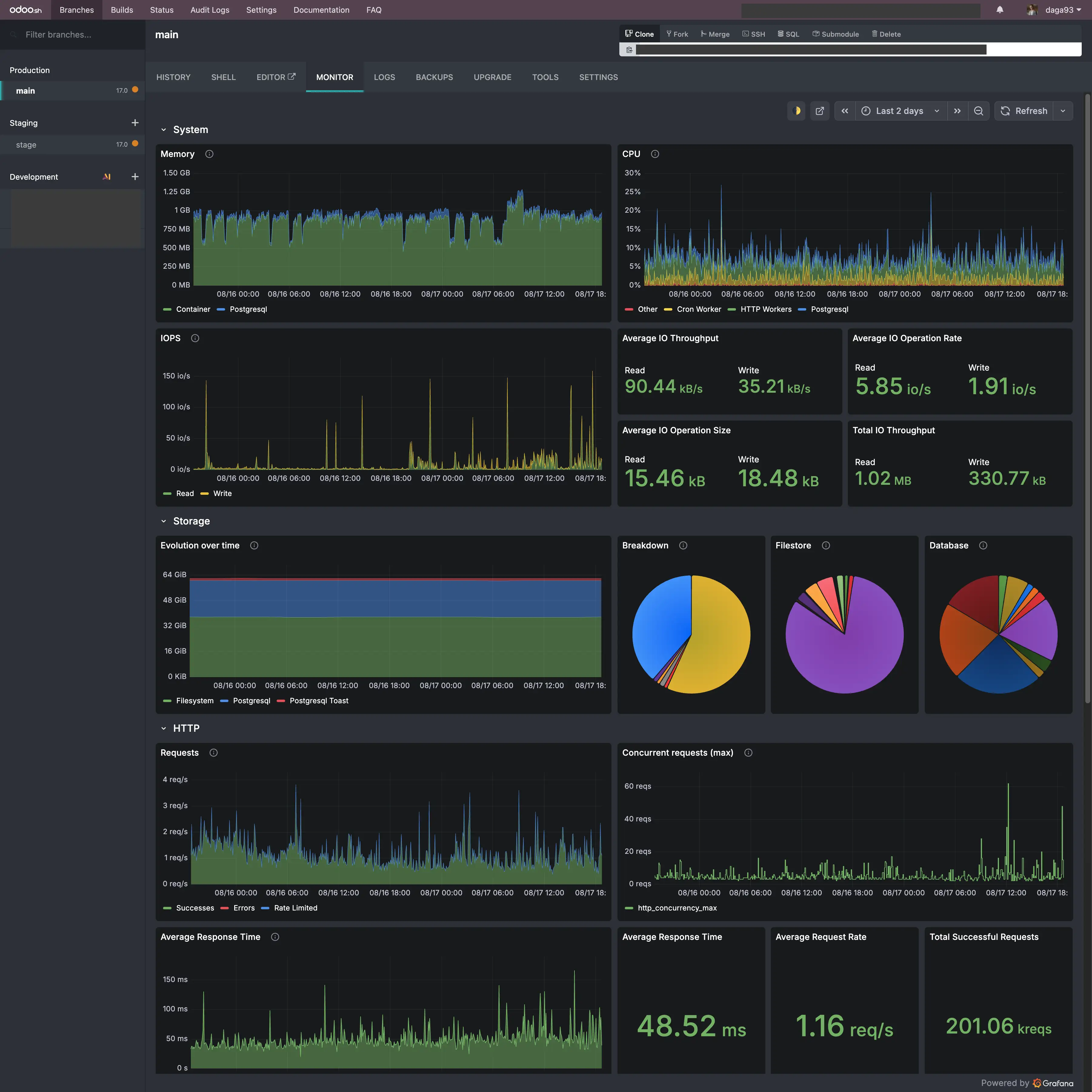
With Odoo.sh you get:
- Infrastructure: Part of a server (shared or dedicated) plus a dedicated PostgreSQL database.
- Backups: Automatic daily, weekly, and monthly backups (kept for up to six months).
- A development environment: Direct GitHub integration, fast creation of staging branches that are copies of the production database.
- Tools and monitoring: Access to logs, built-in performance charts (Grafana), and simple deployment of code changes.
Computing power on Odoo.sh is sized using so-called Workers (1 worker is recommended per roughly 25 users or 5,000 daily website visits), which lets you scale performance flexibly without deep server reconfiguration.
Benefits of working on Odoo.sh
Odoo.sh is, above all, about convenience and saving your admins' and developers' time. You don't need to build infrastructure from scratch or maintain it continuously. The vendor handles weekly Odoo code updates, and version upgrades themselves happen in a semi-automated way.
From a developer's perspective, Odoo.sh significantly streamlines the development cycle: work happens locally and on GitHub, a change lands on a staging branch for safe testing on anonymized data, and once approved — goes straight to production. When building custom Odoo modules, this environment noticeably shortens delivery time.
Odoo.sh pricing structure
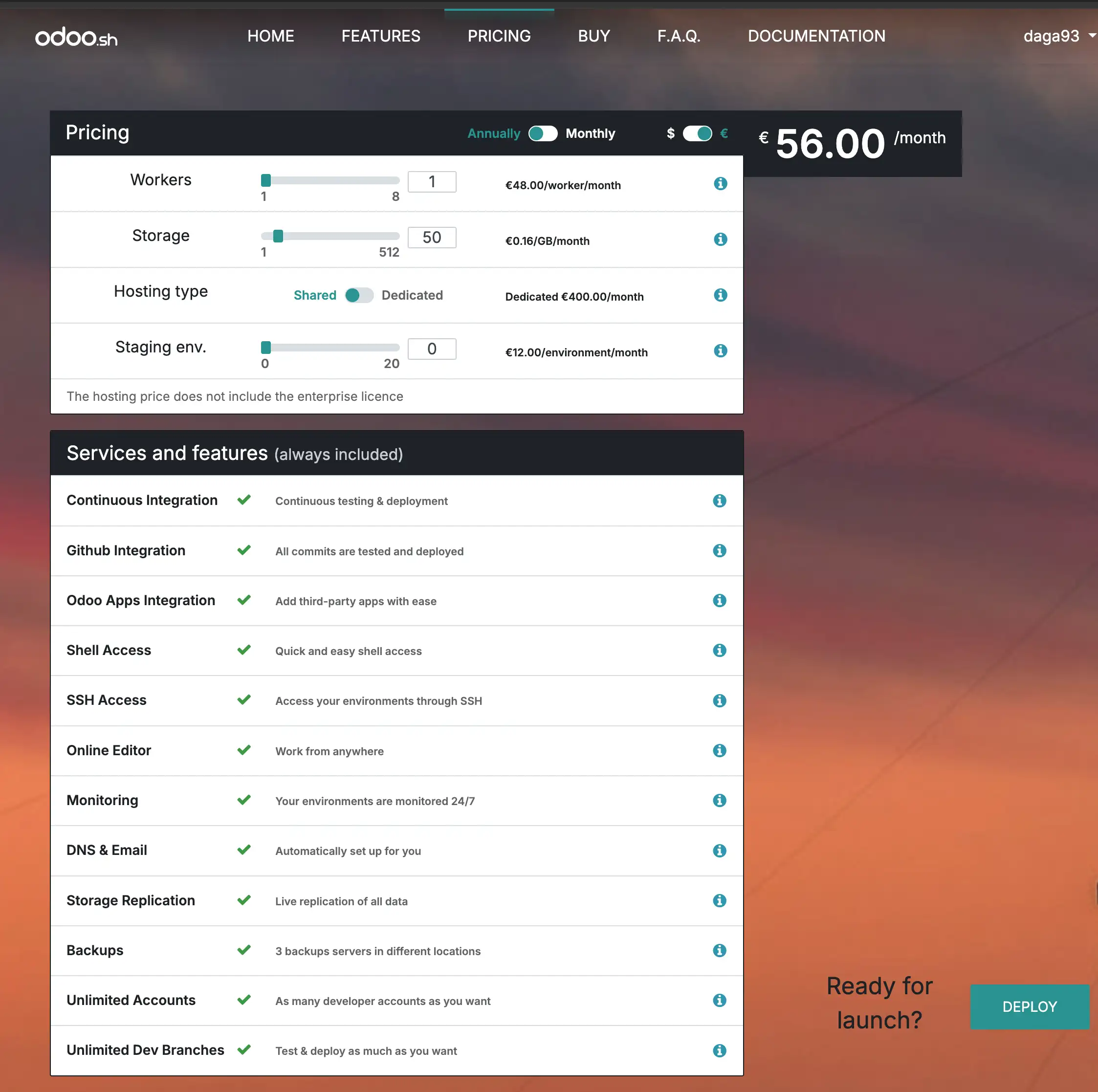
- Number of Workers: The equivalent of RAM and CPU power. 1 Worker costs ~€48/month.
- Storage space: ~€0.16/GB/month.
- Staging branches: ~€12/month each (optional, but highly recommended).
- Dedicated server (option): An extra ~€480/month if you opt out of the shared environment.
Odoo On-Premise
On-Premise is the classic approach, where you rent a server (e.g. VPS/Dedicated at Hetzner, OVH) or use your own infrastructure and install the entire environment yourself.
It's your responsibility to manage the operating system, Python versions, PostgreSQL configuration, security (firewall, SSL), and backup policy.
In exchange, you get full control. On Odoo.sh, you can't deeply modify the PostgreSQL database itself or install unusual system-level services. With On-Premise, you can freely scale the database machine, replicate it, apply advanced clustering, or tune parameters for specific workloads.
Technical limitations – what the price tag doesn't tell you
Beyond the cost of licenses and servers themselves, choosing between Odoo.sh and On-Premise carries significant architectural consequences:
- No access to a root shell or Linux packages: On Odoo.sh you only have access to the Python environment (via a
requirements.txtfile). You can't install custom Linux system packages (apt-get), drivers, or dedicated cryptography libraries. With On-Premise, you have full freedom to configure the operating system. - Odoo Enterprise vs. Community: The Odoo.sh platform is built exclusively for Odoo Enterprise licenses. If you plan to run the free Odoo Community edition (e.g. extended with OCA modules), your only option is your own On-Premise server.
- Integration with devices on your local network (LAN): Cloud-based Odoo.sh has no direct access to your company's local network. Connecting forklifts, industrial scales, or label printers requires the Odoo IoT Box or network tunnels. With an On-Premise install (where the server sits on the same LAN as your warehouse or factory), integrating with PLC controllers and hardware is much simpler.
- Script execution time limits (timeouts): Odoo.sh enforces hard time limits on HTTP requests and background (CRON) jobs. Very large data imports (e.g. hundreds of thousands of products) or complex inventory calculations can get cut off. On your own server, you can freely extend timeout settings in Nginx or Gunicorn.
- Data geolocation and legal requirements: For companies in healthcare, finance, or public-sector organizations, it can be critical to store data physically in Poland, or on a closed network with no internet access. Odoo.sh runs on GCP/OVH infrastructure in specific cloud regions, while On-Premise lets you meet the strictest security requirements (e.g. ISO/GDPR).
Cost comparison: Odoo.sh vs. On-Premise
When estimating costs, you need to account for both the price of infrastructure and the IT specialist time needed to maintain it.
Hardware costs for 25 users (suggested 8 GB RAM / 4 vCPU / 80 GB SSD):
| Parameter | Odoo.sh (PaaS) | Odoo On-Premise (e.g. Hetzner / OVH) |
|---|---|---|
| Server / PaaS license cost | ~€56/month (1 Worker + Staging + Disk) | ~€9–10/month (Hetzner VPS) to ~40 PLN (OVH) |
| Initial setup | Built in (a few minutes) | Several hours of admin/DevOps work |
| Maintenance and updates | Included in the platform price (Odoo) | Internal IT team / implementation partner |
| Control over infrastructure | Limited to the Odoo.sh panel | Full root / PostgreSQL access |
What should you choose for your company?
The final decision depends on your team's skills and the planned scale of the project.
- Choose Odoo.sh if: You value a fast start, a predictable testing environment, and not having to hire a Linux/DevOps admin. It's an excellent industry standard that every Odoo developer will feel at home in immediately.
- Choose On-Premise if: You're planning a long-term project for a large number of users (where Odoo.sh worker costs grow significantly), you need unusual infrastructure integrations, or you already have your own technical setup.
Frequently Asked Questions (FAQ)
Can you move an instance from Odoo.sh to an On-Premise server?
Yes. Odoo lets you easily export a full database along with its files from the Odoo.sh panel. It can then be restored on your own On-Premise server — I can also help with that kind of Odoo migration.
Can you install modules from the Odoo Apps Store on Odoo.sh?
Yes, Odoo.sh fully supports modules from third-party providers as well as custom applications deployed through a GitHub repository.
Looking for the right hosting model, planning an Odoo migration between Odoo.sh and On-Premise, or need help with Odoo consulting? Get in touch – I'll look at your needs and help you make the right call.