

Update (October 2026): the module is available for Odoo 20 in version 1.3. What's new: saved cards (tokenization) with recurring payments in Odoo Subscriptions, automatic completion of stuck payments and refunds, and readable Przelewy24 errors in the logs. Details below.
The Adapt IT Przelewy24 Payments module is available on the official Odoo App Store. It integrates the Przelewy24 payment gateway and lets you accept online payments, including BLIK, fast bank transfers and card payments.
Here's what a Przelewy24 payment looks like in the Odoo shop checkout:
Key features of the Przelewy24 payment module for Odoo
- BLIK, fast bank transfers, card payments, Apple Pay and Google Pay.
- Saved cards and recurring payments (new in version 1.2) — automatic renewals in Odoo Subscriptions, described below.
- Automatic payment processing and status updates for paid orders and invoices, with a full history in Odoo.
- Full and partial refunds directly from Odoo, with refund history.
- The regulations acceptance checkbox Przelewy24 requires in the payment form.
- Lower fees than the gateways available out of the box in Odoo, e.g. Stripe or Adyen — I compared them in my cost comparison of online payments in Odoo.
- Polish and English versions, plus a test mode on the Przelewy24 sandbox.
Saved cards and recurring payments (tokenization)
Since version 1.2, customers can save their card when paying. They pay by card on the Przelewy24 page, and Odoo stores only the Przelewy24 card reference and the last 4 digits — full card data never reaches Odoo.
- Odoo Subscriptions: subscription renewals are paid automatically with the saved card, without the customer. If the bank refuses the charge, Odoo sends the customer a reminder and retries at the next invoicing run.
- Customer portal: customers can add or change a card with a PLN 1.00 payment, which is refunded automatically.
- Shop and portal: paying with a saved card without re-entering card details.
A payment that saves the card goes through a Przelewy24 page limited to cards, because a card used through Google Pay or Apple Pay can't be charged again.
Important: saved cards are an additional service on the Przelewy24 side. Card services are not active by default — neither on the production account nor in the sandbox. Write to your Przelewy24 account manager or technical support and ask them to enable:
- card payments (the "cards" channel),
- reading card data after payment (the
card/infoAPI), - charging a saved card without the customer, i.e. recurring payments (the
card/chargeAPI), - optionally, the additional card payment notification — with it, Odoo learns about a refused payment immediately.
Without these services, card payments go through normally, but the card won't be saved.
The Przelewy24 regulations checkbox
Przelewy24 requires customers to confirm they've read the Przelewy24 regulations before paying. The module adds this declaration to the payment form — until the customer ticks it, the payment button stays inactive.
It's not a formality: before activating a Przelewy24 account, someone from Przelewy24 physically checks that this checkbox is present in your shop. Without it, the account activation will be put on hold. With the module, you don't have to add it by hand.
What's new in versions 1.1–1.3
- Stuck payments completed automatically: if Przelewy24 confirmed a payment but Odoo couldn't verify it (e.g. Przelewy24 was briefly unreachable), the payment doesn't stay stuck. Odoo checks it after 15 minutes and then every hour.
- Refunds without confirmation settled automatically: refunds whose notification never arrived are settled from their state at Przelewy24, for 30 days.
- Readable errors: the logs show the exact error returned by Przelewy24, not just the HTTP code.
- PLN by default: a new payment provider is set to Polish zloty right away.
- Stability fixes: correct notification URLs even without the Website app (e.g. invoices paid in the customer portal), and safer verification of notification signatures.
Configuring the Przelewy24 module in Odoo
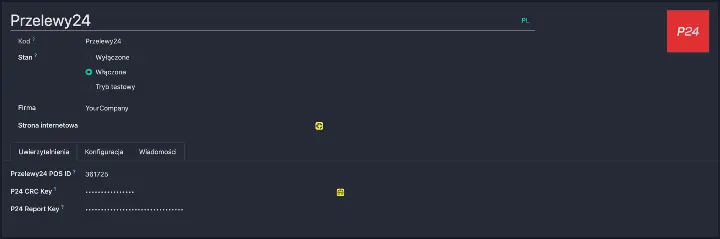
- After installing the module, select Przelewy24 in the payment providers settings.
- In the Credentials section (Configuration tab), paste the data from your Przelewy24 panel: POS ID, CRC key and report key.
- If you want to save cards, ask Przelewy24 to enable the card services (see the section above).
- Test payments in test mode on the sandbox, then switch the provider to production (Live).
How to get the Przelewy24 module?
The module costs €94 and is available on the official Odoo App Store for Odoo 20, in both Community and Enterprise. Looking for an alternative with extensive card handling? See also the TPay payment module.
Check out the module on the Odoo App Store
If you have questions about the setup or about integrating payments with Odoo, feel free to get in touch.