
After the InPost integration, it's time for the next carrier. The new module integrates Odoo with GLS Poland ADE Plus (WebAPI 2) and handles, in one place, courier shipments to the customer's address and deliveries to GLS ParcelShop points. When a delivery is validated, the shipment is created in ADE Plus, the label is attached to the delivery, and parcel numbers and tracking links are saved in Odoo. Nothing has to be re-typed into the GLS panel.
What does the GLS module do for Odoo?
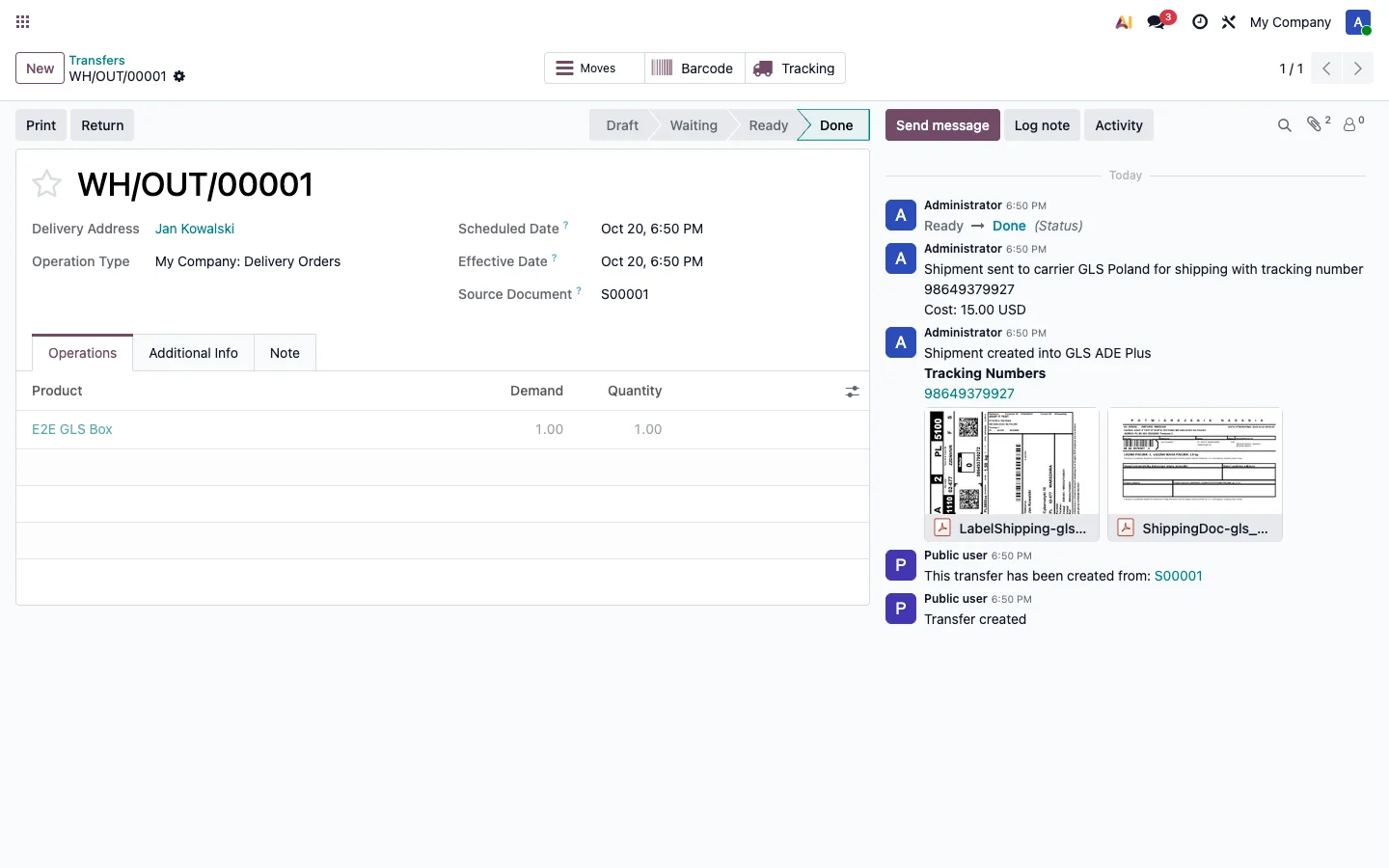
- Courier shipments to the customer's address — including several parcels in one shipment. Each package on an Odoo delivery becomes a separate GLS parcel with its own label and tracking number.
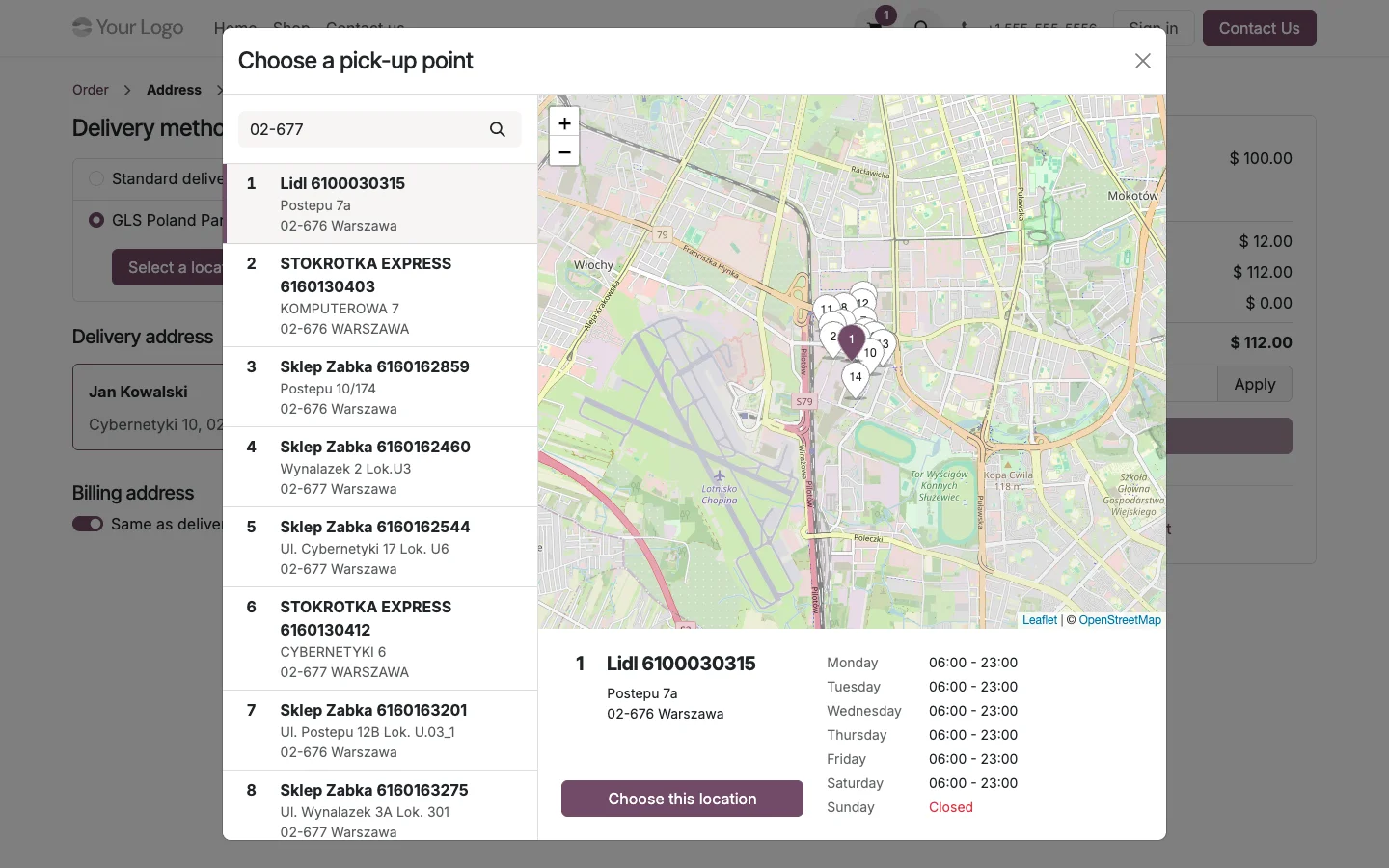
- GLS ParcelShop on a map — the customer picks a point (a shop or a parcel locker) at checkout, and a salesperson can do the same on a quotation. Points come straight from ADE Plus: up to the 15 nearest, with address and opening hours.
- Labels in 12 formats — 160x100 roll (PDF landscape or portrait, Zebra ZPL including 300 dpi, Datamax DPL) and A4 (one or four labels). The label shows the order number and the customer's order reference.
- Shipment tracking — parcel numbers and the GLS tracking link are visible on the delivery and in the customer portal.
- Pickup confirmations for the courier — created for each delivery or in batch, manually or automatically once a day at a set time, with a PDF document for the courier.
How it works, step by step
- Configure the delivery method — enter your ADE Plus login and password, choose the label format and when the pickup confirmation is created. The "Test connection" button checks the credentials right away.
- The customer picks a ParcelShop — the checkout map shows the nearest points, and the chosen point becomes the order's delivery address.
- ParcelShop on the quotation — a salesperson picks a point with the "Choose ParcelShop" button. The order can't be confirmed without a selected point.
- Validate the delivery — Odoo creates the shipment in ADE Plus. The label, parcel numbers with tracking links and, optionally, the pickup confirmation appear on the delivery.
- Pickup confirmation for the courier — in batch mode, one confirmation covers all parcels from the day.
Shipping prices and shipment safety
ADE Plus doesn't expose a price list, so delivery prices come from standard Odoo rules: by weight, price, volume or quantity, separately for home delivery and ParcelShop delivery. Margins, free shipping above a threshold, and invoicing at real cost all work just like in standard Odoo delivery methods.
On the technical side, the module makes sure nothing gets out of sync:
- No duplicate shipments — when Odoo retries or rolls back a delivery validation, the next attempt reuses the shipment already created in ADE Plus.
- GLS errors explained — more than 50 error codes with a readable description and the original code to report to GLS.
- Test environment — on a database copy neutralized by Odoo (e.g. staging on Odoo.sh), the module clears the GLS credentials and switches to the test environment on its own, so no test shipment ever reaches a courier.
- Automatic ADE Plus session renewal, multi-company support, and a Polish and English interface.
Requirements
- Odoo 18, 19 or 20 — Community or Enterprise, with the Sales and Inventory apps. Choosing a point at checkout requires eCommerce; on the quotation it works without it.
- Odoo.sh or a self-hosted install. The module doesn't work on Odoo Online (SaaS), which doesn't allow installing third-party modules. If you're on Odoo Online, see what a migration from SaaS to Odoo.sh or On-Premise looks like — I compared these models in Odoo.sh vs. On-Premise.
- A GLS Poland account with ADE Plus WebAPI 2 access. ParcelShop delivery requires the SDS service on the account — your GLS account manager enables it.
- Shipments that require a customs declaration aren't supported.
Launch price: 79 EUR instead of 99 EUR
To mark the launch, the module costs 79 EUR instead of 99 EUR for the first month. Same module and same support as at the regular price — including 30 days of email support from purchase (installation, configuration, questions about how it works).
Check out the module on the Odoo App Store
Frequently Asked Questions (FAQ)
Do I need a contract with GLS?
Yes. You need a GLS Poland account with ADE Plus WebAPI access, which your GLS account manager enables. Shipping prices come from your GLS contract — you enter them as the delivery method's price list in Odoo.
Do I need a webshop?
No. Shipments, labels, pickup confirmations and choosing a ParcelShop on the quotation all work without eCommerce. The shop is only needed for the customer to pick a point at checkout.
Does the module work on Odoo Online?
No. Odoo Online doesn't allow installing third-party modules. The module works on Odoo.sh and self-hosted installs, in both Community and Enterprise.
Can I test the module before going live?
Yes, and you should — on a database copy (e.g. staging on Odoo.sh) with a GLS test account. On a copy neutralized by Odoo, the module switches to the test environment on its own.
Need an integration with another carrier, or have an unusual shipping process? See how I approach integrating Odoo with external systems, or write to [email protected].