
Typical Problems Related to Production Subcontracting
If you subcontract part of your production to another company and face the following issues:
It is difficult to track order status; sometimes it's unclear when items are returning from the subcontractor or what needs to be dispatched.
The volume of subcontracted orders is so high that organization becomes a challenge, wasting significant time.
Production planning is difficult due to fluctuating lead times and a lack of historical data.
This may be a sign that you need a robust production management system.
The absence of an appropriate IT tool leads to chaos, which generates losses. With a well-chosen production planning program, you can quickly access information on orders, their statuses, and historical data. All of this allows you to save time (and money) and plan production more effectively (leading to higher profits).
The subject of this article is subcontracting and how to more easily manage the logistics associated with this process.
The logistics of a product handled via a subcontractor are more advanced than a standard on-site production route. You need a system that supervises the entire process and allows you to determine exactly what stage the production is at.
The system that enables all of this—and more—is Odoo: an ERP-class software that provides the essential tools for production planning and inventory control.
Odoo - Production Management and Subcontracting
A Production Management System based on Odoo allows you to define and track warehouse flows. By addressing the needs mentioned above, our implementation provides:
Quick and intuitive overview of subcontracting orders with statuses and details (including convenient searching and filtering).
A system that automatically creates delivery orders to the subcontractor based on the Bill of Materials (BoM), reducing manual work.
Visibility and Traceability – you know exactly what leaves and returns from the subcontractor and when (see Image 1, Image 2, and Image 3).
A tool for data overview and analysis (e.g., verifying historical lead times from a specific subcontractor).
Vendor Portal (where they can check orders, download invoices, etc.; see Image 4, Image 5, Image 6, and Image 7).
Check out more about what the production management system we implement offers.
Detailed Presentation of the Subcontracting Control System
How does it work in detail within the context of manufacturing and subcontracting management?
Odoo ERP allows for the definition of multi-stage production processes, including subcontracting. Production stages are defined by adding Bills of Material (BoM) and specifying operations at Work Centers. Subcontracting is a specialized operation type in Odoo.
Once this operation is defined, you must also add the vendor performing the service. When correctly configured, during production planning (creating manufacturing orders), the system will automatically generate a purchase order for the subcontractor's service, as well as the outgoing delivery of products to the subcontractor (e.g., material for hardening) and the planned receipt back into the warehouse once the service is complete.
In an Odoo-based production management system, we can map the production process very accurately. Depending on whether you supply semi-finished products for processing (service subcontracting) or the subcontractor handles the entire process (product subcontracting), different logistic routes apply.
In the case of service subcontracting:
You will see information regarding subcontractor provisioning (shipments).
You will see information regarding the delivery from the subcontractor (receipts; delivery date based on estimated lead times).
In the case of product subcontracting:
You will see information regarding the expected delivery from the subcontractor.
These are not the only possibilities. The two types presented above are available by default in Odoo. If you have advanced workflows, the system allows them to be reflected. You can also define routes like drop shipping (where the finished product goes directly to the customer instead of your warehouse).
WMS - Warehouse Management and Logistics in Odoo
All information is available in a simple and intuitive interface. This is what the Odoo inventory movements panel looks like:
 Image 1. Odoo Inventory Dashboard – planned warehouse movements are visible on a single screen. Note the "Resupply Subcontractor" card, which indicates that goods are waiting for transport to the subcontractor.
Going to one of the cards, you will see:

Image 2. List view of delivery orders to the subcontractor in Odoo. You can easily filter and search for specific items using the search bar at the top of the page.
By clicking on a list item in Image 2, you will be redirected to the details of the stock transfer order. On the form, you will find all essential information, such as quantity, scheduled date, and full audit trail (history). The navigation buttons at the top of the page allow you to jump to related stock moves or the original order.

Image 3. Detailed view of a delivery order to a subcontractor in Odoo.
A dedicated Barcode app is also available (included in the package), featuring integrated barcode scanning to significantly accelerate warehouse operations.
Vendor Convenience - The Portal
Odoo also allows us to share orders via a Vendor Portal where the subcontractor can log in. After logging in, the subcontractor sees their orders and their current status. This provides another level of control and helps the subcontractor organize their orders without needing to contact you directly.
From the subcontractor's perspective, the portal looks like this:
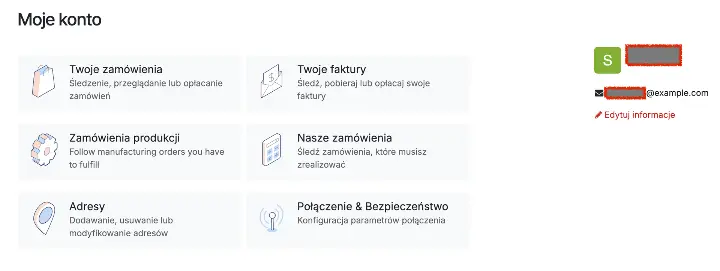 Image 4. Main view of the portal dashboard. Manufacturing orders are visible under "Manufacturing Orders". The subcontractor can also see all purchase orders and invoices (under "Our Orders").

Image 5. List view of manufacturing orders in the Odoo portal.
 Image 6. Detailed view of a manufacturing order in the Odoo portal.

Image 7. View of a purchase order in the Odoo portal.
Discuss Your Implementation
If you need a system that allows you to track production status and logistics operations related to subcontracting, contact us. We provide a system that will meet your expectations. We specialize in tools supporting manufacturing. Schedule a call: