
Another module created under the Adapt IT brand has been added to the official Odoo store: Przelewy24 Payments.
This module provides integration with the Przelewy24 payment gateway, enabling online payments, including BLIK and quick bank transfers. All options offered by the Przelewy24 integrator are available.

Main Functions of the Odoo Przelewy24 Payment Module
The module created by Adapt IT ensures integration with Odoo eCommerce and other Odoo functionalities. What do you gain by purchasing the module? Here is the list:
- Acceptance of BLIK payments, quick bank transfers, card payments, Apple Pay, and Google Pay.
- Automatic payment processing, changing the status of paid orders and invoices with a full history overview in Odoo.
- Integration with Przelewy24, resulting in lower commissions compared to gateways natively available in Odoo (e.g., Stripe, Adyen).
- Ability to issue refunds to customers directly from Odoo, including a full refund history.
- Two language versions – Polish and English.
- Integration testing via a test mode that performs operations on a sandbox (Przelewy24 test server).
Watch this one-minute video demonstrating the module:
Configuration – How to Configure the Przelewy24 Module in Odoo
Configuration boils down to a few simple steps:
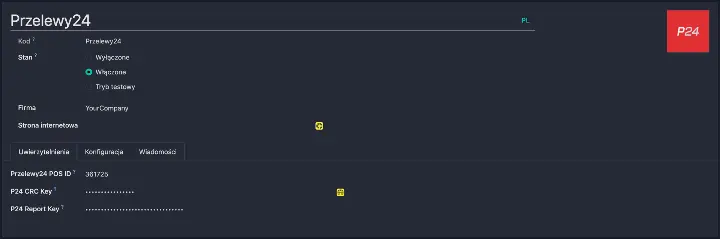
- After installing the module, select Przelewy24 in the Payment Providers settings.
- In the "Credentials" tab, paste the data from the Przelewy24 panel: POS ID, CRC Key, and Reports Key.
- After saving and activating, the payment method becomes available to customers.
How to get the Przelewy24 Payment Module?
The module is available for purchase in the official Odoo App Store. If you have any questions regarding configuration, feel free to contact us.